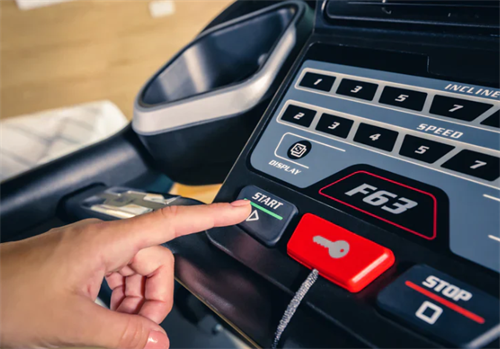
Step onto any treadmill, and you’ll be greeted by a glowing screen filled with numbers—speed, incline, calories burned, distance, time. For beginners, it can feel like piloting a spaceship. Even for regular runners, the question lingers: how much of this data is accurate, and how much should we really rely on?
Let’s break down the three most important metrics—incline, speed, and calories—and separate useful insights from marketing noise.
Incline: The Hidden Power of the Hill
One of the easiest ways to make treadmill workouts more effective is by adjusting the incline. A slight upward tilt mimics walking or running uphill, which recruits more muscles in the legs and raises your heart rate without necessarily increasing speed.
0% incline: Equivalent to flat ground, but in reality, it feels slightly easier than running outside because there’s no wind resistance.
1–2% incline: Often recommended to “simulate” outdoor running conditions more realistically.
5–10% incline: Builds strength and endurance, targeting your calves, hamstrings, and glutes. Great for interval training.
Above 10% incline: Demanding on both muscles and joints—best used sparingly for hill sprints or power walking.
Incline is not just about burning more calories. It conditions your body for real-life challenges like hiking, improves running efficiency, and strengthens the lower body. If you’re looking to get more out of treadmill time, adjusting incline is one of the smartest moves.
Speed: The Most Straightforward (Yet Misleading) Number
Speed seems like the simplest metric—faster means harder, right? That’s partly true, but context matters.
Treadmill speed is measured in miles per hour (mph) or kilometers per hour (km/h). It’s consistent because the belt moves at a set pace, unlike outdoor running where terrain and wind can change effort levels.
Walking pace: 2–4 mph (3–6 km/h)
Jogging pace: 4–6 mph (6–9 km/h)
Running pace: 6–9 mph (9–14 km/h)
Sprinting pace: 9+ mph (14+ km/h)
Here’s where it gets tricky: what feels “fast” on a treadmill may not match what feels fast outside. Without natural variations like wind resistance, your muscles and breathing might adapt differently. That’s why treadmill runners sometimes struggle to match their indoor speed when they transition outdoors.
The takeaway? Use treadmill speed as a training tool, but don’t obsess over numbers alone. Pay attention to how your body feels—breathing rate, perceived effort, and heart rate can tell you more than the speed setting.
Calories: Take the Number with a Grain of Salt
Calories burned is often the most eye-catching stat on the treadmill screen, but it’s also the least accurate. These numbers are estimates, and they rarely account for all the variables that affect energy expenditure—your age, weight, fitness level, metabolism, and even running efficiency.
Most treadmills base their calculation on generic formulas, and unless you’ve input your personal data (weight, sometimes age), the numbers can be far off. Studies suggest treadmill calorie counters can be off by 15–30%.
Instead of obsessing over the exact calorie number, use it as a relative measure. For example:
If you burned 200 calories yesterday and 250 today under similar conditions, you know you worked harder.
Compare calorie readouts between different incline and speed settings to see which combinations push you more.
Think of the calorie display as a guide, not gospel.
How to Read the Data Smarter?
Combine metrics: Don’t look at speed, incline, or calories in isolation. Instead, use them together to gauge effort. For example, a slower speed at a higher incline may be tougher than a faster flat run.
Track progress, not perfection: Focus on trends over time rather than exact numbers. Are you lasting longer, running faster, or handling more incline with less fatigue? That’s the real progress.
Listen to your body: Numbers are tools, but your breathing, form, and energy levels are the ultimate data sources.
The treadmill screen can feel like a scoreboard, but it’s really just a set of tools. Incline teaches you endurance and strength, speed helps you gauge intensity, and calories offer a rough estimate of effort. None of them are perfect, but together they can guide you toward smarter, more effective workouts.
Recommend:

The Rise of Female Power: Say Goodbye to “Skinny Beauty,” Embrace Muscular Lines
Second-hand Fitness Equipment Purchase Guide: Save Money and Stay Safe
Isolation Training vs. Compound Training: How to Arrange Your Movement Sequences?

Fitness Challenge: 30 Days of Body Shaping, 75 Hard, Is It Motivation or Risk?